Tech support scams are a fast-growing type of fraud in which criminals pretend to be trusted technology companies or technical experts so they can steal money, personal information, or control of your devices. These schemes often use urgent pop-up warnings, unexpected phone calls, or misleading search ads to trick you into acting before you have time to think.
This guide explains how these scams work, the warning signs to watch for, and concrete steps to protect yourself, your family, and your devices.
What Is a Tech Support Scam?
A tech support scam happens when someone falsely claims that there is a serious problem with your computer, phone, account, or network and offers to “fix” it for a fee or in exchange for remote access. In reality, there is usually nothing wrong. The scammer’s real goal is to make you pay for fake services or steal sensitive information such as passwords, bank credentials, or Social Security numbers.
Tech support scams frequently reference well-known companies (for example, large software or device manufacturers) to appear legitimate, even though they are not actually affiliated with those companies.
Common Ways Tech Support Scammers Reach You
Fraudsters reuse a few core tactics but constantly change details like company names or graphics. Knowing the main approaches will help you stay ahead of them.
1. Fake Security Pop-Ups or On-Screen Alerts
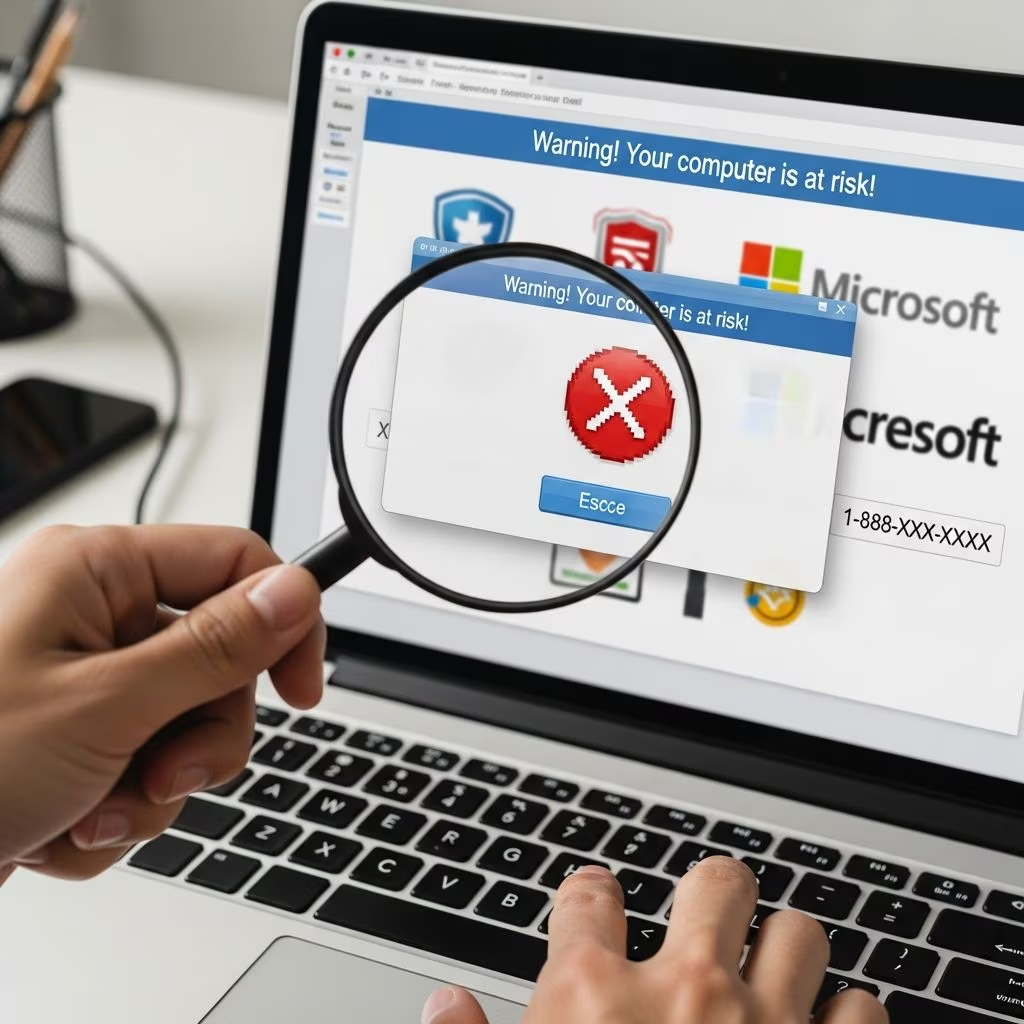
One of the most common techniques is to display a frightening message right on your screen. These pop-ups can appear while you browse the internet, open an email attachment, or click on a malicious link.
- Alarming language: Messages may claim your device is infected, hacked, or blocked.
- Forced urgency: Warnings might say that your data will be erased or stolen unless you act immediately.
- Prominent phone number or button: The alert usually includes a phone number to call or a button to click to “fix” the problem.
- Imitation logos: Scammers often copy official logos, fonts, and color schemes of large technology companies to look authentic.
Legitimate browser or operating system alerts typically do not provide a telephone number to call and will not pressure you to act within seconds.[10]
2. Unsolicited Phone Calls or Voicemails
Another frequent method is a direct phone call from someone who claims to be a technician or security specialist.
- Caller ID spoofing: The number on your display may be faked so that it appears local or resembles a known company name.
- Pretend diagnostics: The caller may say they detected viruses, data leaks, or suspicious activity from your device or internet connection.
- Step-by-step instructions: They may guide you to install remote access tools or navigate to a website that installs malware.
Reputable companies do not typically call you out of the blue to report problems you did not first report yourself.
3. Misleading Online Ads and Search Results
Scammers pay for advertisements that appear above legitimate search results when you look for technical support. Their websites can appear professional and use believable names like “Windows Help Center” or “Printer Support Line.”
- Look-alike domains: Slightly misspelled domain names that mimic official sites.
- Fake support numbers: Phone numbers advertised as “official” but not associated with the actual manufacturer.
- Pressure to pay quickly: Demands for immediate payment before any work is done.
4. Email and Text Phishing Messages
Fraudulent emails or text messages may claim that your account will be closed, your subscription has expired, or your device is infected. They often contain links that lead to fake login pages or install harmful software.
How Scammers Try to Take Control
After making contact, scammers use a series of steps designed to gain your trust and access to your funds or data.
| Scammer Goal | Typical Tactics Used | What They Want From You |
|---|---|---|
| Convince you there is a serious problem | Use scary language, show fake error logs, or manipulate your screen display | Your fear and willingness to accept “help” without verifying |
| Gain remote access to your device | Ask you to install a remote desktop app or grant permission through built-in tools | Full control to install malware, change settings, or view files |
| Obtain payment | Request payment via gift cards, wire transfers, payment apps, or cryptocurrency | Irreversible funds that are hard to recover once sent |
| Steal personal or financial data | Ask for account logins, banking details, or copies of ID “for verification” | Information that can fuel identity theft or unauthorized charges |
Key Warning Signs of a Tech Support Scam
While scammers constantly adjust details, most tech support frauds share recognizable red flags. If you notice one or more of these, stop and reassess before taking any action.
- Unsolicited contact: You receive a call, pop-up, or message about a problem you did not notice yourself.
- High-pressure tactics: You are told that your data will be destroyed, your device will be locked, or your accounts will be stolen unless you respond immediately.
- Requests for remote access: The person insists that they must take control of your computer or phone to fix the issue.
- Demands for unusual payment methods: They ask to be paid with gift cards, wire transfers, cryptocurrency, or person-to-person payment apps.
- Resistance to verification: They discourage you from hanging up, calling back using a number on the official website, or speaking with a friend or family member.
- Vague or inconsistent information: They are unable to answer basic questions about the alleged problem or your actual account.
Consumer protection agencies regularly warn that these high-pressure tactics and unusual payment demands are common elements of fraud, not legitimate technical assistance.
How to Respond Safely When You See a Suspicious Alert
If you see a pop-up or receive a sudden warning about your device, staying calm is the most important step. Use the following checklist to respond in a controlled way.
Step 1: Do Not Call or Click Right Away
- Ignore any phone numbers or clickable buttons in the pop-up itself.
- Do not provide bank details, Social Security numbers, or passwords.
- Avoid installing apps or software suggested by the alert.
Step 2: Close the Suspicious Window
- Try to close the browser tab or window using the normal close button.
- If that does not work, use keyboard commands to force-close the browser (for example, through your operating system’s task manager or force-quit tools).
- Restart your device if needed; this often clears the fake alert.
Step 3: Verify Directly with the Real Company
- Go to the company’s official website by typing its address into your browser (do not click links from the alert).
- Use the support phone number or contact options listed on the official site.
- If you have an account with the company, sign in normally and check for messages or security notifications.
Regulators encourage consumers to use official channels and contact information rather than numbers presented in unsolicited alerts.[10]
Step 4: Run a Legitimate Security Scan
- Use reputable, up-to-date antivirus or antimalware software to scan your device.
- Apply any recommended fixes provided by the legitimate software.
- Keep your operating system and applications updated to reduce vulnerabilities.
What to Do If You Already Engaged with a Scammer
If you realize after the fact that you have been dealing with a scammer, act quickly. Swift steps can limit financial loss and reduce the risk of identity theft.
If You Gave Remote Access
- Disconnect immediately: Turn off your internet connection or unplug your router.
- Remove remote access tools: Uninstall any software or apps that the scammer asked you to install.
- Run a full security scan: Use trusted antivirus or antimalware tools on all potentially affected devices.
If You Paid the Scammer
- Credit or debit card: Contact your bank or card issuer right away and explain that you may have paid a scammer. Ask whether they can stop or reverse the charge and monitor your account for fraud.
- Bank transfer: Reach out to your bank immediately to report the fraudulent transfer; the sooner you act, the better your chances of recovery.
- Gift cards: Keep the cards and receipts and contact the card issuer. Some issuers may be able to void transactions that have not yet been fully processed.
- Payment apps or cryptocurrency: Report the transaction through the platform’s support tools, although recovery is often difficult or impossible.
If You Shared Personal Information
- Passwords: Change passwords for all affected accounts and enable multi-factor authentication where available.
- Financial details: Ask your bank or credit union to place alerts on your accounts for unusual activity.
- Social Security number or similar identifiers: Consider placing a fraud alert or security freeze with major credit reporting agencies to reduce the risk of new-account fraud.
Report the Scam
Reporting scams helps enforcement agencies track patterns, warn the public, and, in some cases, take legal action against offenders. U.S. federal agencies encourage consumers to report tech support scams and other frauds through their official complaint portals.
Preventive Steps to Reduce Your Risk
Although no measure can eliminate risk completely, following basic digital hygiene significantly lowers your chances of becoming a victim.
- Update software regularly: Enable automatic updates for your operating system, browser, and security tools.
- Use reputable security software: Install trusted antivirus and antimalware programs and keep them up to date.
- Type addresses yourself: When seeking support, type the official website address into your browser instead of clicking on ads or links from emails.
- Limit who can access your devices: Set strong passwords or passcodes, use biometric locks where available, and avoid sharing devices with people you do not know well.
- Learn to read browser indicators: Check that the address bar shows the correct domain name and uses secure connections (“https”), although this alone does not guarantee safety.
- Teach family members: Explain scams to older adults and younger users in your household, who are often heavily targeted.
Helping Older Adults and Other High-Risk Groups
Research and enforcement data indicate that older consumers are frequently targeted with impersonation schemes, including tech support fraud. Families and caregivers can play an important role in prevention.
- Talk regularly about common scams and red flags.
- Encourage older adults to consult a trusted friend or relative before paying for unexpected tech help.
- Offer to help check devices or contact legitimate support when an issue arises.
- Monitor for unexplained charges or large withdrawals when appropriate and lawful.
Frequently Asked Questions (FAQs)
How can I tell if a pop-up warning is real?
Legitimate security alerts from your operating system or antivirus software typically do not include a phone number to call. Real alerts will identify the software issuing the warning and will usually provide options such as “run a scan” or “view details” rather than demanding that you call a technician immediately.[10]
Is it ever safe to give remote access to a support technician?
Remote access can be safe if you initiate the contact using information from an official website and are dealing with a known, reputable provider. You should never grant remote access to someone who contacts you unexpectedly or refuses to let you verify their identity.
What payment methods do scammers prefer?
Tech support scammers commonly request payment through gift cards, wire transfers, cryptocurrency, or certain payment apps because these methods are fast and difficult to reverse. Regulators warn that any demand for payment by gift card is a strong indicator of fraud.
Can a scammer really see everything on my computer?
If you install remote access software and grant full control, the scammer may be able to view your screen, access files, install programs, and capture passwords you type. That is why disconnecting promptly and removing any remote access tools is critical if you suspect fraud.
Should I report an attempted scam even if I did not lose money?
Yes. Reporting attempted scams helps enforcement agencies gather evidence, understand tactics, and warn others, even when no money changes hands. Many government consumer protection agencies encourage reporting both successful and attempted fraud.
References
- Consumer Protection — Federal Trade Commission. 2025-05-01. https://www.ftc.gov/consumer-protection
- Protecting Older Consumers 2024-2025: A Report of the Federal Trade Commission — Federal Trade Commission. 2024-10-18. https://www.ftc.gov/reports/protecting-older-consumers-2024-2025-report-federal-trade-commission
- Rules — Federal Trade Commission. 2024-09-10. https://www.ftc.gov/legal-library/browse/rules
- FTC Rule on Unfair or Deceptive Fees to Take Effect on May 12, 2025 — Federal Trade Commission. 2025-05-01. https://www.ftc.gov/news-events/news/press-releases/2025/05/ftc-rule-unfair-or-deceptive-fees-take-effect-may-12-2025
- Consumer Protection Laws and Regulations: USA 2025 — ICLG. 2025-04-09. https://iclg.com/practice-areas/consumer-protection-laws-and-regulations/usa