Fake USPS Delivery Messages: How to Spot and Stop Parcel Scams
Criminals use fake USPS texts and emails about undeliverable parcels to steal data and money—learn how to recognize and avoid these schemes.
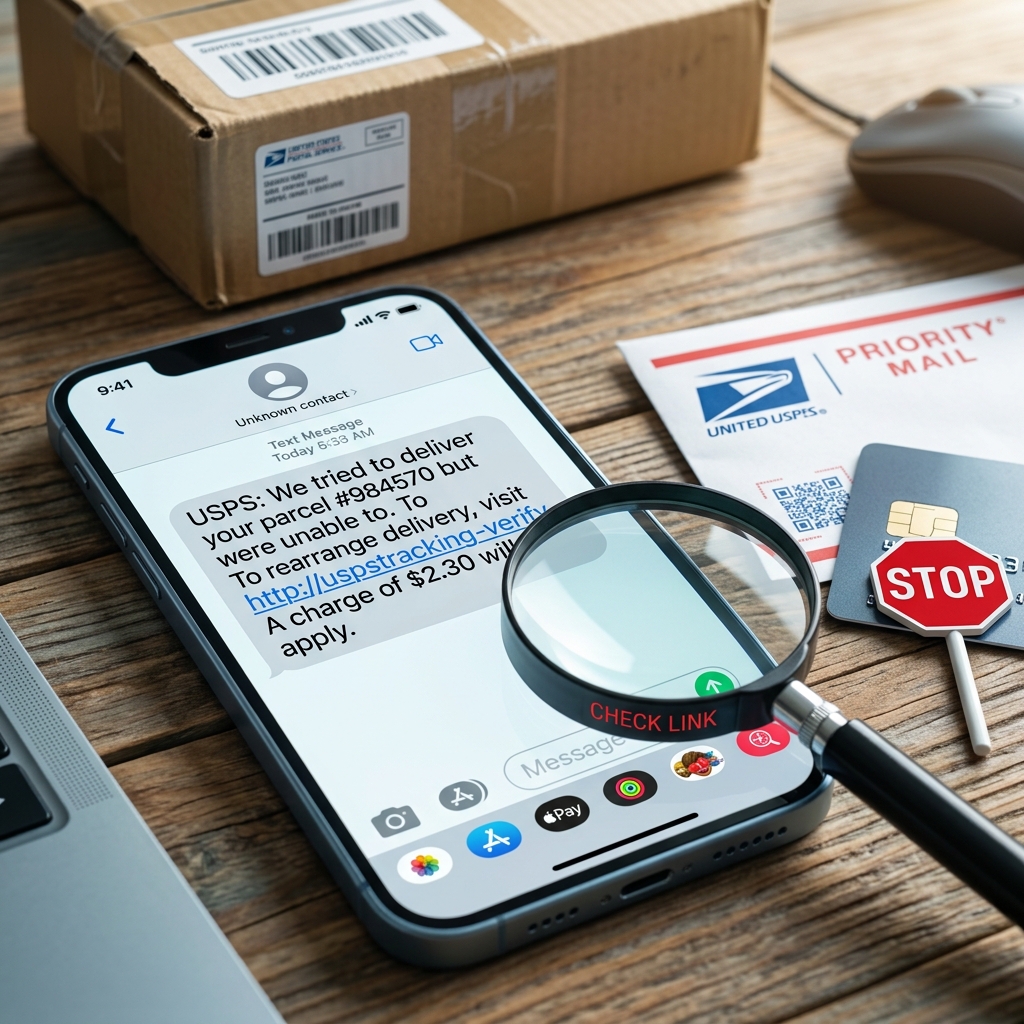
Digital communication has made it easier than ever to track packages—unfortunately, it has also made it easier for scammers to impersonate delivery services. One of the most common schemes involves fake USPS emails and text messages that claim a package cannot be delivered and urge you to click a link to fix the problem. These scams are carefully designed to steal your personal information, payment data, or even install malware on your devices.
This article explains how these scams work, the warning signs you should watch for, and the specific steps you can take to protect yourself if you receive a suspicious parcel notification.
What Are Fake USPS Parcel Delivery Scams?
Fake USPS parcel delivery scams are a type of phishing and smishing (SMS phishing) attack where criminals send messages pretending to be the United States Postal Service. The message usually claims there is a problem with a delivery—perhaps the address is incomplete, the ZIP code is wrong, or the package cannot be delivered until you take action.
The messages typically include a link that appears to lead to an official USPS site or tracking page. In reality, the link directs you to a fraudulent webpage designed to:
- Harvest your personal information (name, address, date of birth, Social Security number)
- Capture your login credentials for email, bank, or shopping accounts
- Collect payment card data, allegedly to pay a redelivery fee
- Install malware or spyware on your device when you click or interact with the page
Because many people expect packages—from online shopping, gifts, or subscriptions—these scams exploit common behaviors and appear timely and believable.
Common Types of Fake USPS Messages
While individual scams vary, most fake USPS delivery messages follow recognizable patterns. Understanding these patterns can help you quickly identify fraudulent communications.
Email-Based Parcel Delivery Scams
Fake USPS emails often arrive in your inbox with subject lines mentioning failed delivery attempts or undeliverable parcels.
- Subjects that create urgency – Examples include phrases like “Delivery Failure Notice,” “Package Held at Facility,” or “Action Required: Incomplete Address.”
- Generic tracking details – Scammers may show a fake tracking number or simply refer to “your USPS package” without specific information.
- Embedded links or buttons – You are prompted to click “Confirm Address,” “Pay Redelivery Fee,” or “View Shipment Status,” leading to a malicious site.
Text Message (Smishing) Parcel Scams
Text-based scams have become extremely common as people increasingly rely on mobile devices for package notifications. The U.S. Postal Inspection Service warns that scammers send SMS messages claiming to provide tracking updates or request address confirmation.
- Short, urgent texts – Messages may say: “USPS: Your package is pending. Correct your address via the link.” or “Parcel cannot be delivered, reschedule now.”
- Suspicious sender numbers – Messages can originate from random mobile numbers or foreign country codes unrelated to USPS operations.
- Links to look-alike domains – The URL may resemble official USPS addresses but contain subtle misspellings or extra characters.
How Scammers Make Fake USPS Messages Look Real
To increase the likelihood that you will click, scammers often add realistic details and mimic legitimate USPS communication styles.
| Tactic | How It Tricks Victims |
|---|---|
| Use of USPS logo and colors | Makes emails and websites appear official and trustworthy at first glance. |
| Fake tracking numbers and barcodes | Creates the impression of a real shipment with system-generated identifiers. |
| Urgent language | Pressures you to act quickly so you skip careful review (e.g., “Last attempt,” “Immediate action required”). |
| Look-alike web addresses | Domains differ by a character or extension from official USPS sites, hoping you won’t notice. |
| Personalized-sounding text | Messages may reference a ZIP code or city, making it feel tailored to your location. |
Red Flags That Indicate a Fake USPS Delivery Message
Even well-crafted scams usually contain clues that something is wrong. Recognizing these indicators can prevent you from falling victim.
Technical and Visual Clues
- Unusual sender address or phone number – Official USPS emails come from domains associated with the Postal Service, not free email accounts; text messages from foreign numbers or random mobile numbers are suspect.
- Errors in spelling and grammar – Frequent mistakes, inconsistent capitalization, or awkward phrasing may signal a non-professional sender.
- Generic references to “your package” – Legitimate messages often include specific tracking numbers or shipment details; vague references are a warning sign.
- Non-standard formatting – Strange layouts, broken images, or mismatched fonts can indicate a hastily assembled scam email.
Behavioral and Content Clues
- Unexpected contact method – USPS notes that it rarely contacts customers about package problems via unsolicited texts or emails, especially for payment-related issues.
- Requests for personal or financial information – The Postal Service and other reputable companies do not request sensitive details such as full Social Security numbers, passwords, or credit card data via email or SMS.
- Pressure to click quickly – Messages that urge you to respond “within 24 hours” or risk losing your package are manipulating your sense of urgency.
- Links that do not match official sites – Hovering over email links or carefully reading SMS URLs may reveal unrelated or suspicious domains.
How to Verify a Parcel Notification Safely
When you receive a message about a delivery problem, it may be tempting to click immediately. Instead, take a few simple steps to verify whether the communication is legitimate.
Use Official USPS Tools
- Go directly to the official tracking page – Type the official USPS website address into your browser yourself and use your known tracking number from the sender or retailer.
- Check known shipments – Log in to your online shopping accounts or email receipts to confirm whether a package is actually in transit.
- Contact USPS through verified channels – Use contact information listed on the official site or a recent receipt, not phone numbers or links included in the suspicious message.
Stop and Ask Key Questions
Before interacting with any delivery-related message, pause and consider:
- Am I expecting a package right now?
- Does this message match tracking information I already have?
- Is the sender address or phone number consistent with past legitimate USPS notifications?
- Is the message asking for sensitive information that a delivery service should not need?
If any answer raises doubts, treat the message as suspicious.
Practical Steps to Protect Yourself
Preventing fraud is largely about adopting safer digital habits. Financial institutions and security experts recommend several best practices to guard against delivery-related scams.
Safe Clicking and Browsing Habits
- Never click on links from unexpected messages – Instead, navigate to the official site manually by entering the address in your browser.
- Avoid downloading attachments – Emails that include invoices, delivery notes, or ZIP files related to unrecognized shipments may hide malware.
- Keep devices and security software updated – Applying updates helps protect against known vulnerabilities exploited by scam websites and malicious links.
Protecting Your Accounts and Identity
- Use strong, unique passwords – Create passwords of at least 12 characters and avoid reusing them across multiple accounts.
- Enable multifactor authentication (MFA) – Adding a second verification step makes it harder for criminals to access your accounts even if they steal your password.
- Monitor your financial activity – Regularly review bank and card statements for unauthorized charges, especially after receiving suspicious messages.
What to Do If You Clicked a Fake USPS Link
If you realize you have clicked a suspicious link or entered information on a fake USPS page, quick action can limit the damage.
Immediate Response Steps
- Disconnect from the site – Close the browser or app immediately and avoid interacting with the page further.
- Change compromised passwords – If you entered login details, change your password on that account and any other account where you used the same or similar password.
- Contact your bank or card issuer – If you provided payment information, notify your financial institution so they can monitor and potentially block fraudulent activity.
- Run a security scan – Use reputable antivirus or mobile security apps to check for malware on the device you used.
Reporting the Scam
Reporting helps authorities track scam operations and may assist in protecting others. The U.S. Postal Inspection Service provides specific guidance for reporting USPS-related smishing and fake emails.
- For suspicious USPS text messages – Without clicking the link, copy the text message body into a new email, include your name, attach a screenshot showing the sender’s number and date, and send it to spam@uspis.gov.
- Forward scam texts to short code 7726 – Many carriers use this number to collect and block scam SMS messages.
- Report to federal authorities – You can report fraud attempts to the Federal Trade Commission through its ReportFraud site, as recommended by consumer protection organizations.
USPS and Consumer Protection Guidance
Official USPS guidance emphasizes that many email and text communications claiming to be from the Postal Service are fraudulent. The agency warns that emails may contain false information about attempted deliveries or intercepted packages and that people should be cautious about unexpected messages referencing postage payments or redelivery.
Financial institutions and consumer protection groups echo this advice, warning that package delivery scams commonly begin with email or text messages suggesting a package is either in transit or cannot be delivered until the recipient takes a specified action. Following official recommendations can help you distinguish legitimate communications from scams.
Frequently Asked Questions About Fake USPS Parcel Scams
1. Does USPS send text messages about delivery problems?
USPS may send certain automated messages in some contexts, but it rarely uses unsolicited texts to request personal information or payment related to delivery issues. If a text asks you to correct your address, pay a fee, or click a link to reschedule delivery, it is safer to assume it is fraudulent and verify using official channels.
2. How can I tell if a USPS email is legitimate?
Check the sender’s email address, look for specific tracking details you recognize, and confirm any claims by visiting the official USPS website directly. Legitimate emails should not ask for sensitive personal data or direct you to unrelated domains for payment.
3. I received a message saying my ZIP code is wrong. What should I do?
Do not click the link in the message. Instead, use your known tracking number to check status on the official USPS tracking page or contact USPS via its verified customer service channels. Messages that claim ZIP code errors and demand immediate correction are a common scam pattern.
4. Are all parcel-related texts fake?
Not all parcel-related texts are fraudulent; some retailers and carriers send legitimate updates. However, any message that arrives unexpectedly, asks for personal or financial information, or directs you to unfamiliar websites should be treated with caution. Always verify by going directly to the retailer’s site or the official carrier website rather than relying on embedded links.
5. Can my phone get malware from clicking a scam link?
Yes. Some scam links lead to websites that attempt to install malicious software or use deceptive tactics such as fake CAPTCHA tests to trigger downloads. Mobile devices are not immune, so you should avoid clicking links in suspicious messages and keep your phone’s security software and operating system updated.
Key Takeaways for Safer Package Tracking
- Be skeptical of urgent delivery messages claiming a package cannot be delivered or requires immediate action.
- Do not click links in unexpected USPS emails or texts; instead, access the official site manually.
- Never share sensitive information such as passwords, Social Security numbers, or full payment details in response to an unsolicited message.
- Report suspicious communications to the Postal Inspection Service and relevant consumer protection agencies.
- Maintain strong security practices including updated software, strong passwords, and multifactor authentication to reduce the impact if a scam succeeds.
By combining awareness of scam tactics with practical security measures, you can continue enjoying the convenience of online shopping and package tracking while significantly reducing your risk of falling victim to fake USPS parcel delivery schemes.
References
- Smishing: Package Tracking Text Scams — U.S. Postal Inspection Service. 2023-06-01. https://www.uspis.gov/news/scam-article/smishing-package-tracking-text-scams
- Scams & Scheme Alerts — United States Postal Service. 2023-05-10. https://faq.usps.com/s/article/Scams-Scheme-Alerts
- How to Spot a USPS Delivery Scam — Marquette Bank. 2024-02-14. https://emarquettebank.com/financial-education/articles-insights-for-you/how-to-spot-a-usps-delivery-scam
- Package Delivery Scams — American Bankers Association. 2023-04-20. https://www.aba.com/advocacy/community-programs/consumer-resources/protect-your-money/package-delivery-scams
- USPS Delivery Scam (Text Messages) — Brown University Office of Information Technology. 2022-09-15. https://it.brown.edu/phish-bowl-alerts/usps-delivery-scam-text-messages
Similar Articles








Read full bio of medha deb