Phishing emails that claim a consumer complaint or official government action has been filed against your business are a growing threat to small businesses and professionals. These messages often look official, use government logos, and invoke fear to trick recipients into clicking malicious links or opening infected attachments. Understanding how these scams work and how to respond is essential for protecting your data, your money, and your reputation.
What Are “Consumer Complaint” Email Scams?
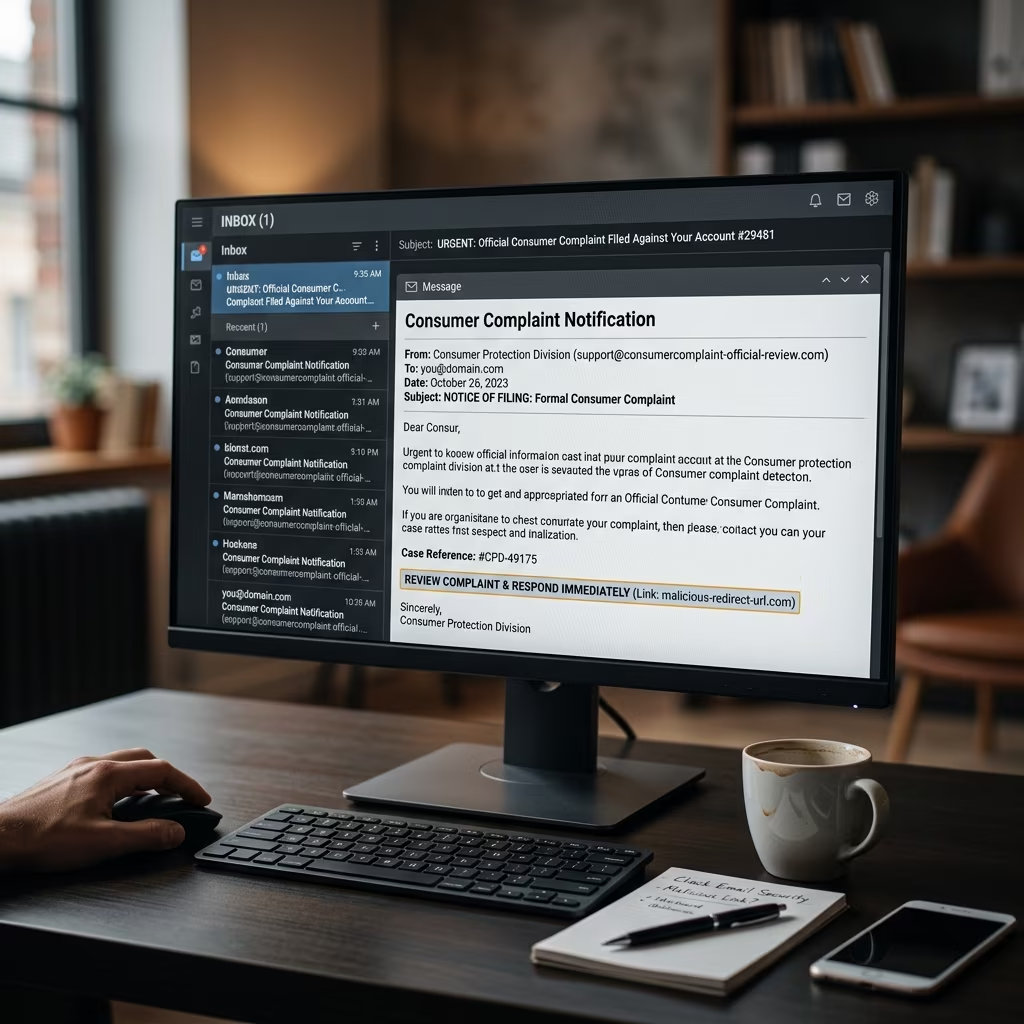
In a typical consumer complaint email scam, a criminal sends a message that appears to come from a legitimate organization such as the Federal Trade Commission (FTC), a consumer protection agency, or a business watchdog group. The email falsely claims that a complaint has been filed against your company, then urges you to click a link or open an attachment to view the details. In reality, the link or file is designed to capture credentials or install malware.
These messages leverage urgency and fear: most business owners are concerned about regulatory problems or reputational damage, so they may react quickly before noticing warning signs.
- Impersonation: The sender pretends to be a government agency, regulator, or consumer group.
- False allegation: The email states that a complaint or investigation has been opened against your business.
- Malicious action: You are directed to click a link, open an attachment, or enter sensitive information to “resolve” the issue.
Why Scammers Pretend to Be Government or Consumer Agencies
These scams are part of a broader category known as government imposter scams and phishing attacks. Scammers know that many people will respond quickly to messages that appear to come from regulators or law enforcement. The goal is to bypass your normal skepticism by invoking authority and the risk of penalties.
Common impersonated entities include:
- National consumer protection agencies (for example, the FTC).
- Business watchdogs such as local Better Business Bureau organizations.
- Postal and inspection services that deal with fraud or consumer complaints.
- Tax authorities or other government departments.
Because these organizations genuinely handle complaints, enforcement actions, and investigations, the fake emails can be convincingly framed as routine notices. That is why it is critical to learn the specific signs that distinguish a phishing email from a legitimate communication.
How These Email Scams Typically Work
Although individual messages vary, many consumer complaint phishing emails follow a similar pattern. Understanding the typical workflow helps you recognize scams before you click.
| Step in the Scam | What Happens | Risk to You |
|---|---|---|
| Initial email | You receive a message claiming a complaint or investigation is open against your business. | Emotional pressure; fear of fines or reputational harm. |
| Call to action | The email instructs you to click a link or open an attachment to view complaint details or respond. | Risk of installing malware or visiting a fake website. |
| Credential theft | If you click, you may be taken to a fake site that asks for login credentials or personal data. | Loss of account access, identity theft, or unauthorized transactions. |
| Malware infection | Attachments may contain malicious code that infects your device or network. | Data loss, ransomware, or spying on business activities. |
| Further exploitation | Scammers reuse stolen data to access financial accounts, email, or internal systems. | Financial loss, business disruption, and reputational damage. |
Key Warning Signs of a Fake Complaint Email
Government and consumer agencies regularly warn the public that phishing emails are common and can be extremely deceptive. However, several recurring indicators can help you distinguish fake complaint notifications from legitimate correspondence.
Suspicious Sender and Domain
Always check the sender’s address carefully. Official government agencies use specific domains (for example, “.gov” in many countries). A message from a generic email service, a misspelled domain, or a domain that does not match the real agency’s official site is a strong warning sign.
- Look for spelling errors or extra characters in the domain (e.g., “ftc-gov.com” instead of an official agency domain).
- Be cautious if the sender’s name does not match the email address.
- Compare with contact information listed on the agency’s official website.
Unexpected Message About a Complaint or Investigation
If you receive an email claiming that a complaint has been filed against you or your business but you were not expecting such a notification, treat it as suspicious until verified. Scammers rely on surprise to push you into immediate action.
- You have not received any prior communication by mail or through known official channels.
- The complaint details are vague or generic.
- The message demands fast action (“within 24 hours” or “immediately”) to avoid penalties.
Links and Attachments You Did Not Request
One of the most consistent warning signs of phishing is an unsolicited request to click a link or open an attachment. In consumer complaint scams, this is often framed as the only way to see the complaint or respond to it.
- Hyperlinks may lead to websites that look official but have unusual URLs.
- Attachments may have unfamiliar file types or names that do not match the stated purpose.
- Hovering over links (without clicking) may reveal domain names that do not match the claimed organization.
Poor Grammar, Formatting, or Unprofessional Tone
While some phishing emails are polished, many contain grammatical errors, awkward phrasing, or unusual formatting. Official government and consumer agencies typically follow formal language standards and clear formatting.
- Multiple spelling errors or inconsistent capitalization.
- Generic greetings like “Dear Sir/Madam” instead of a specific contact name.
- Overly aggressive or threatening language that does not match official guidance on complaint handling.
Immediate Steps to Take If You Receive a Suspicious Complaint Email
If an email claiming to be a consumer complaint or government notice triggers any of the warning signs above, you should respond cautiously. Several simple steps can help you limit risk to yourself and your business.
1. Do Not Click Links or Open Attachments
The most important step is to avoid interacting with any link or file in the suspicious email. Many government and consumer protection agencies explicitly advise the public to delete such emails without responding or clicking.
- Do not reply to the email.
- Do not download or open attachments.
- Do not click any embedded links, buttons, or QR codes.
2. Verify Through Official Channels
If you are unsure whether a complaint is real, contact the relevant organization using publicly listed contact information—not anything included in the email. Visit the agency’s official website or call a published phone number to ask whether a complaint has been filed.
- Use a search engine or known bookmarks to reach the official agency site.
- Look for complaint or case reference numbers that you can ask the agency to verify.
- Do not use phone numbers, URLs, or email addresses provided in the suspicious message.
3. Report the Scam
Reporting phishing attempts helps authorities track trends and warn other businesses. Consumer protection agencies encourage victims and targets of phishing to forward suspicious messages to designated addresses or complaint portals.
- Forward phishing emails to anti-phishing groups such as specialized reporting addresses mentioned by authorities.
- Report suspected scams to national fraud reporting platforms (for example, complaint portals managed by consumer regulators).
- Where applicable, forward government imposter emails to inspection services or fraud units recommended in official guidance.
4. Secure Your Devices and Accounts
If you suspect you may have clicked a malicious link or opened an attachment, take steps to protect your computer and accounts. Consumer protection agencies recommend updating and running reputable security software, then removing any detected threats.
- Update your security software and run a full system scan.
- Delete any malware or spyware identified by the scan.
- Change passwords for email, banking, and business platforms, ideally using multi-factor authentication.
Best Practices to Prevent Phishing and Complaint Scams
Although no single measure can eliminate risk, combining technical protections with staff training is highly effective. Consumer and technology regulators consistently highlight basic security practices that significantly reduce vulnerability.
Strengthen Technical Security
- Use up-to-date security software: Install reputable antivirus and anti-malware tools on all devices and configure automatic updates.
- Enable multi-factor authentication: Add extra verification steps to high-value accounts, such as email and financial services.
- Apply regular operating system and application updates: Security updates close known vulnerabilities that phishing attacks may exploit.
- Use pop-up blockers and cautious download practices: Avoid installing software from unknown sources and ignore pop-ups that request urgent action.
Train Staff and Establish Internal Procedures
For businesses, preventing phishing damage is also a matter of policy. Clear internal rules help employees react consistently when they receive suspicious emails.
- Provide regular training on how to recognize phishing and government imposter scams.
- Designate a contact person or team for reporting suspicious messages.
- Set clear instructions for verifying any complaint or regulatory notice through official websites or phone numbers.
- Encourage a culture where employees feel comfortable questioning unusual emails, even if they appear to come from senior staff or regulators.
Create a Response Plan for Incidents
Planning ahead can reduce the impact if someone does click on a malicious link. An incident response plan should cover technical containment, communication, and legal or regulatory steps.
- Identify who is responsible for coordinating the response (internal IT, external support, or both).
- Prepare a checklist for disconnecting compromised devices from networks, changing passwords, and contacting relevant service providers.
- Consider whether you may have reporting obligations to customers, regulators, or partners in case of a serious data compromise.
FAQs: Consumer Complaint and Government Imposter Email Scams
1. Are regulators allowed to notify me of complaints by email?
Many regulators and consumer agencies may use email for some types of communication, but they often rely on secure portals, postal mail, or verified contact channels for sensitive matters. If an email about a complaint arrives unexpectedly or demands immediate action via a link, verify it using contact details from the agency’s official website before responding.
2. I clicked on a link before realizing it might be a scam. What should I do?
Immediately update and run your security software to scan for malware, then remove any threats identified. Next, change passwords for important accounts and enable multi-factor authentication where available. If financial accounts or business systems may be affected, contact the relevant providers for assistance and monitoring.
3. How can I know if a complaint email from a business watchdog group is genuine?
Do not rely on the contact information or links in the email itself. Instead, visit the organization’s official website directly, using a bookmark or independent search, and check for complaint lookup tools or contact details. You can ask the organization to confirm whether a complaint number or case reference actually exists.
4. Should I forward suspicious emails to anyone?
Authorities encourage forwarding phishing emails to designated reporting addresses to help track and combat scams. Check guidance from your national consumer protection agency or postal inspection service for the appropriate email or portal. After reporting, delete the phishing email from your inbox.
5. Why are small businesses particularly vulnerable to these scams?
Small businesses may have limited IT resources and less formal training on cybersecurity. At the same time, they handle valuable data and rely heavily on email for communication. Scammers exploit this combination by sending convincing messages that appear related to complaints, regulatory issues, or account problems.
Summary: Stay Calm, Verify, and Protect Your Business
Fake consumer complaint and government imposter emails are designed to provoke fear and urgency. By learning the warning signs, refusing to click unknown links or attachments, and verifying any complaint through official channels, you can significantly reduce the risk to your business and your personal data. Combine technical safeguards with staff training and clear procedures to build resilience against these persistent and evolving scams.
References
- FTC Warns of ‘Consumer Complaint’ Email Scam — FindLaw / Thomson Reuters. 2016-03-03. https://www.findlaw.com/legalblogs/small-business/ftc-warns-of-consumer-complaint-email-scam/
- How to Recognize and Avoid Phishing Scams — Federal Trade Commission (FTC). 2024-02-01. https://consumer.ftc.gov/articles/how-recognize-avoid-phishing-scams
- How to Spot and Report Government Imposter Scams — U.S. Postal Service Office of Inspector General (USPS OIG). 2017-03-07. https://www.facebook.com/oig.usps/posts/1333374135488557/
- Better Business Bureau Warning on Email Scam — ABC10 News / Better Business Bureau. 2016-01-05. https://www.facebook.com/ABC10News/posts/1157491476409775/