
How to Spot a Fake Airline Confirmation Email
Learn how convincing travel emails work, what warning signs to watch for, and how to respond safely.
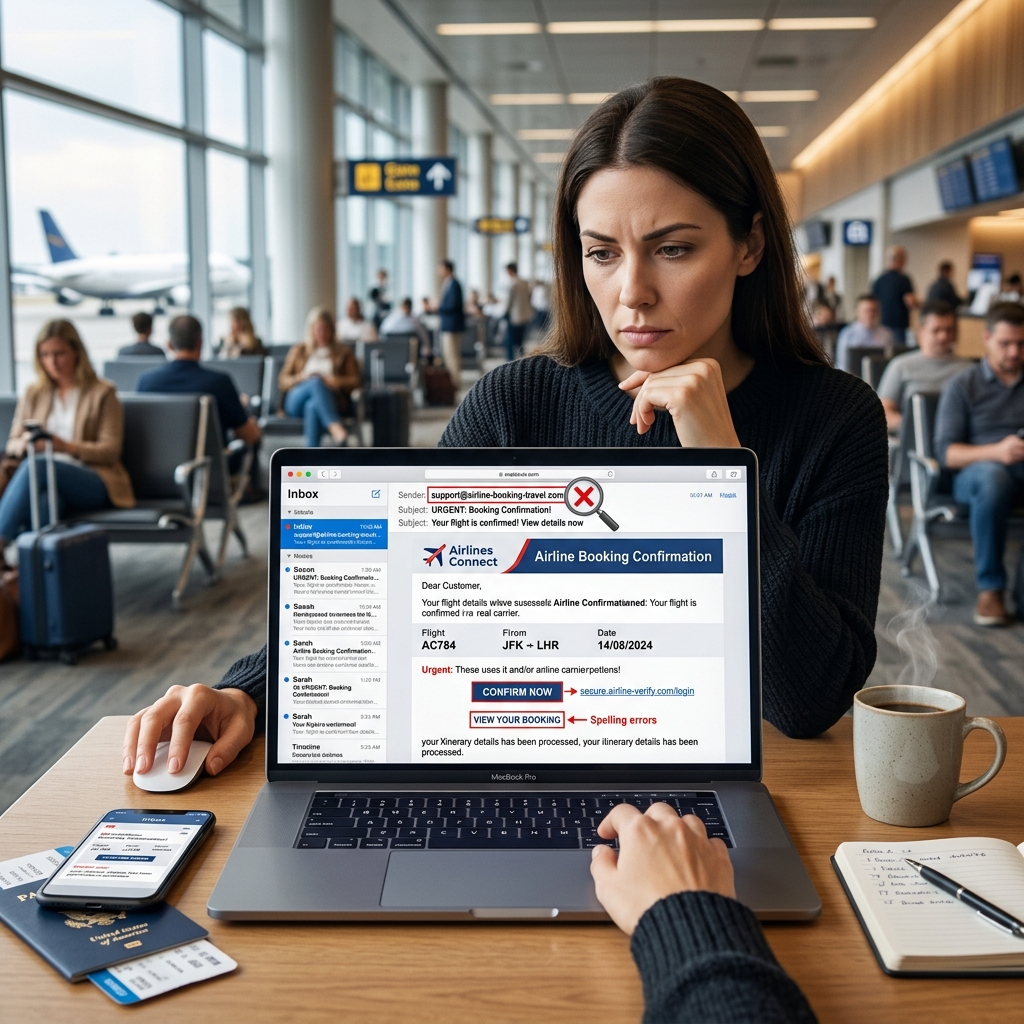
Airline-themed phishing emails are effective because they borrow the look and language of legitimate travel notifications. A message may appear to confirm an upcoming flight, warn of an itinerary change, or invite you to review reservation details, but the real purpose is often to get you to click a malicious link or hand over sensitive information.
These scams are persuasive because they exploit routine travel behavior. Many travelers expect booking updates, gate changes, and check-in reminders, so an unexpected email does not immediately seem suspicious. Understanding how these scams work makes it easier to spot the differences between a real airline message and a fraudulent one.
Why travel-related phishing works so well
Phishing succeeds when it creates urgency and familiarity at the same time. Airline messages are especially useful to criminals because they often include dates, times, confirmation numbers, and branded layouts that feel routine. The recipient may assume the email must be legitimate simply because it references travel details.
Security guidance from Delta states that the company will never ask for a password through email, a phone call, or social media, and it warns customers not to click links in suspicious messages or open unexpected attachments. That kind of guidance reflects the broader logic of phishing defense: when a message pressures you to act quickly, the safest move is to pause and verify the sender independently.
Common signs that an airline email is fake
Not every fraudulent message looks obviously broken. In fact, many of the most dangerous examples are polished enough to fool careful readers. Still, there are several warning signs that can reveal a scam if you inspect the email closely.
- Odd sender details: A message may use a display name that looks official while the actual address contains misspellings, extra letters, or a strange domain.
- Requests to click immediately: Real travel alerts may include links, but phishing messages often push you to click without giving you a chance to verify anything first.
- Spelling or punctuation mistakes: Small errors can signal that the message was assembled quickly or copied from a template.
- Suspicious attachment behavior: If the email asks you to open a file to see your itinerary, treat that as a red flag.
- Pressure to provide personal data: Any request for passwords, payment details, or identity information should be treated with caution.
One frequently cited clue in a fraudulent airline message is the return address. In a real message, the sender domain should match the airline’s official domain, while a scam may use a lookalike address that differs by a single character or extra word. That kind of detail can be easy to miss if you are reading quickly on a phone screen.
How legitimate airline messages usually differ
Authentic airline notifications are typically designed to reduce confusion, not create it. They often include itinerary details directly in the body of the email, and they usually direct customers to an official website or app where account activity can be checked securely. If the message is real, the airline should not need to pressure you into entering personal information through an unfamiliar link.
That difference matters because scammers rely on behavioral shortcuts. If you expect to see your flight number, departure city, or check-in reminder, you may be less likely to question the message. But a legitimate airline email should still behave like a professional communication, not like a trap hidden behind urgency.
What to do if you receive a suspicious booking email
If an unexpected confirmation arrives in your inbox, the safest approach is to treat it as unverified until you confirm it through a separate channel. Do not reply to the message, do not call any phone number included only inside the email, and do not click the embedded links before checking the sender details.
- Log in to the airline’s official website or app by typing the address yourself.
- Check whether the reservation appears in your account.
- Contact the airline using a phone number or support page you locate independently.
- Delete the email if it appears suspicious and avoid forwarding it to other people unless you are reporting it through an official security channel.
The University of Michigan’s security guidance for a fake booking email gives the same basic advice: do not reply, do not follow the links, and do not provide personal information or credit card numbers. That advice is simple, but it is effective because it prevents the scam from progressing to the point where data is exposed.
Protecting your accounts after a suspicious message
Even if you do not click anything, a suspicious travel email is a useful reminder to check your digital security habits. If you have reason to think your email account, airline account, or payment card may have been exposed, take immediate steps to reduce the risk of further harm.
- Change your email password if you suspect your inbox has been compromised.
- Use a unique password for your airline account and enable multi-factor authentication if the service offers it.
- Review recent account activity for unfamiliar logins or booking changes.
- Watch bank and credit card statements for unauthorized charges.
- Report the suspicious message to your email provider and, if appropriate, the airline’s security team.
Delta’s published security guidance also recommends changing your password and monitoring your account if you believe someone else has access to your SkyMiles information. It further advises customers to contact the airline directly through official channels if unusual activity appears.
What scammers want from airline-themed emails
The goal is usually broader than one stolen login. A fake confirmation email can be used to harvest names, email addresses, passwords, payment card details, and enough personal information to support identity theft or additional fraud. In some cases, the link may lead to a fake login page that captures credentials. In others, it may deliver malware or redirect the user to a malicious site.
Because travel emails often move quickly and contain time-sensitive language, they create the ideal conditions for social engineering. The scammer does not need to be perfect; they only need the victim to click once.
Quick comparison: real vs. suspicious airline emails
| Feature | Legitimate message | Suspicious message |
|---|---|---|
| Sender address | Matches the airline’s official domain | Uses a lookalike or misspelled domain |
| Message content | Includes clear itinerary details and standard language | Creates urgency or asks you to act immediately |
| Links | Directs to official airline pages | Pushes you to unfamiliar pages or login forms |
| Requests for information | Does not ask for passwords by email | May request personal, payment, or login details |
| Quality | Usually polished and consistent | May contain subtle spelling or punctuation errors |
Best practices for avoiding phishing in the future
The easiest way to reduce risk is to treat all unexpected booking emails with skepticism until verified. That does not mean ignoring legitimate travel updates. It means using a reliable process for confirming them before you interact with any links or attachments.
- Bookmark official airline websites and use those saved links instead of email buttons.
- Use a password manager so lookalike sites do not fool you into entering credentials manually.
- Turn on account alerts for logins, reservations, and payment activity.
- Check the full sender address on a desktop or in an email app that shows complete headers more easily.
- Train family members who travel often, because one mistaken click can expose a shared inbox or payment card.
These habits may sound routine, but they are the practical defenses that keep a convincing fake from becoming a financial or identity problem. Phishing often succeeds not because the victim is careless, but because the message arrives at a moment when the person is busy and expects travel-related communication.
Frequently asked questions
Should I open a confirmation email if I do not recognize the trip?
It is safer to avoid interacting with the message and verify the reservation through the airline’s official website or support line first. If no booking exists in your account, the email is likely fraudulent or misdirected.
Can a scam email still be dangerous if I do not enter any information?
Yes. Simply clicking a malicious link can expose you to credential theft, tracking, or malware. Delta specifically warns users not to open attachments or click suspicious links in messages that claim to be promotional or account-related.
What if the email looks almost identical to a real airline notice?
That is exactly when caution matters most. Scams often copy branding closely and rely on tiny mistakes, such as a slightly altered sender address or subtle punctuation errors, to avoid detection.
Who should I contact if I suspect fraud?
Start with the airline through its official channels, then contact your bank or card issuer if payment information may have been exposed. If money was lost, local law enforcement may also be appropriate to contact. Delta’s own guidance tells customers who notice unusual activity to change their password and reach out through official support paths.
Why a cautious response is usually the right response
Airline phishing emails are successful because they imitate a normal part of modern travel. They exploit the fact that many people are accustomed to receiving confirmations, reminders, and updates by email. The solution is not to distrust every message automatically, but to build a habit of checking the source before clicking.
When in doubt, pause, verify, and use the airline’s official website or customer service line instead of the message itself. That small delay is often enough to stop a scam from turning into an account compromise or financial loss.
References
- Protect Your Data — Delta Air Lines. 2026-07-09. https://www.delta.com/us/en/legal/privacy-and-security/protect-your-data
- New scam uses real-looking airline email to steal personal information — ABC7 New York. 2026-07-09. https://abc7ny.com/post/scam-uses-real-looking-airline-email-to-steal-personal-info/2127808/
- Booking confirmation — University of Michigan Safe Computing. 2021-08-30. https://safecomputing.umich.edu/phishing-alerts/booking-confirmation-2021-08-30-000000
- Protect Your Data — Delta Air Lines. 2026-07-09. https://www.delta.com/us/en/legal/privacy-and-security/protect-your-data
- Delta warns of e-mail scam — YouTube. 2026-07-09. https://www.youtube.com/watch?v=o8P-In7PKHE
Similar Articles








Read full bio of medha deb


