Stay Safe From Online Scams: Practical Steps To Protect You Now
Practical ways to recognize fraud, protect your information, and respond quickly if a scam target you online.
Staying Safe in a World Full of Digital Traps
Online scams continue to evolve, but most of them still rely on the same weaknesses: urgency, trust, curiosity, and inattention. Fraudsters use email, text messages, social media posts, fake websites, and phone calls to persuade people to hand over money or sensitive information. The good news is that many scams can be avoided with a few simple habits and a healthy amount of skepticism.
This guide explains how to recognize common warning signs, protect your devices and accounts, and react quickly if you think you have been targeted. It focuses on practical steps that reduce risk whether you are shopping, banking, browsing social media, or responding to an unexpected message.
Why Scams Work So Well
Online scams succeed because they are designed to push people into fast decisions. A fake payment notice may threaten account suspension. A phishing email may claim your package is delayed. A text message may say a friend needs urgent help. These tactics create pressure, and pressure makes careful checking less likely.
Scammers also copy familiar brands and services. They may borrow logos, language, and page layouts from banks, retailers, delivery companies, or tech firms. That means even cautious users can be fooled if they do not pause and verify details before acting.
Warning Signs That Should Make You Stop
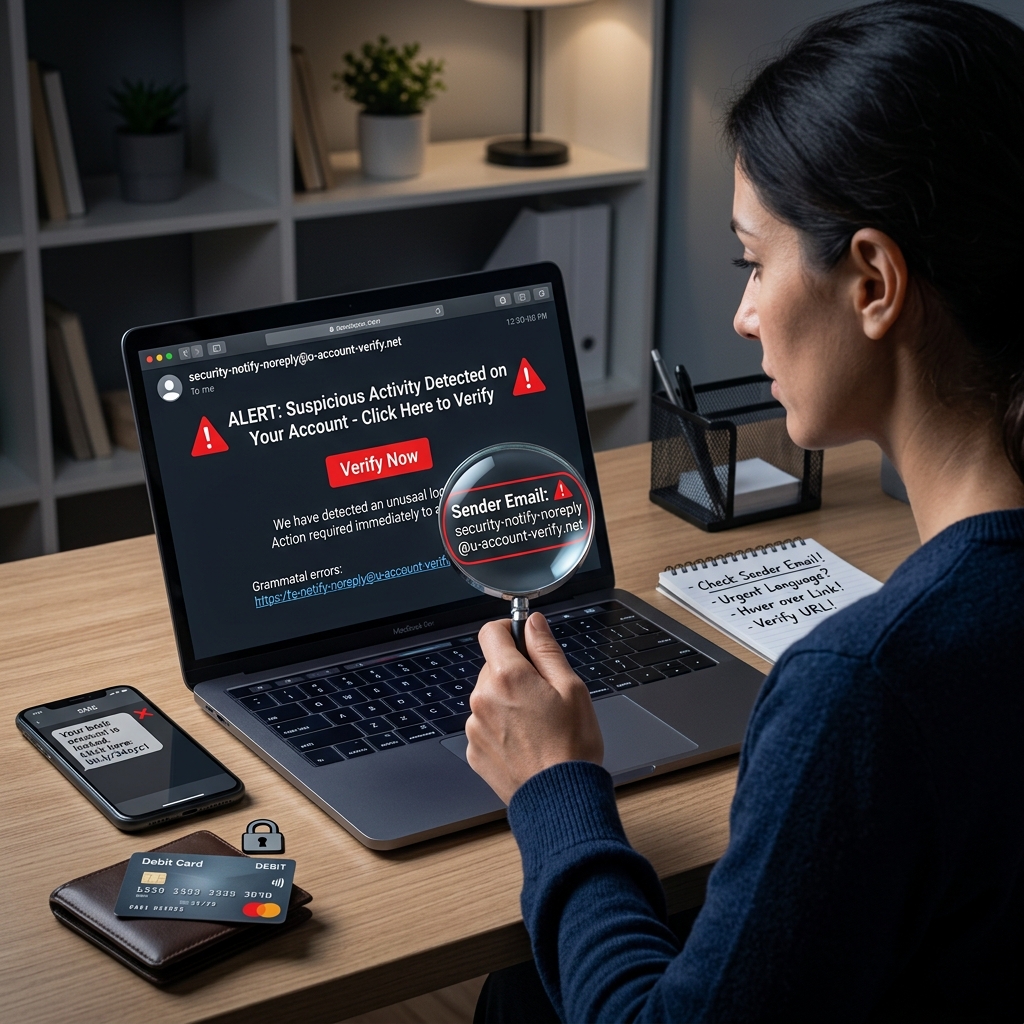
Many scams reveal themselves through small inconsistencies. A message may contain poor spelling, unusual wording, or an email address that does not match the organization it claims to represent. A website may have a misspelled domain name, missing security indicators, or a checkout page that feels rushed or incomplete.
- Unsolicited messages that demand immediate action.
- Requests for passwords, verification codes, or account numbers.
- Links that lead to unfamiliar or suspicious web addresses.
- Offers that are unusually generous or sound too good to be true.
- Messages that create panic, fear, or a sense of emergency.
When any of these signs appear together, the safest response is to stop and verify the source before clicking, paying, or replying.
How to Check Whether a Message Is Legitimate
If a message claims to come from a company you do business with, do not use the contact information or links inside the message. Open a new browser window and go to the company’s official website yourself, or use a phone number from a statement, card, or trusted records you already have.
For emails, inspect the sender address carefully. Scammers often use names that look familiar but hide an address from a different domain. For texts, watch for short links, awkward phrasing, and messages that try to force a quick decision. For social media, be skeptical of posts that advertise giveaways, refunds, investment opportunities, or miraculous discounts with little explanation.
If the communication involves a financial institution or account service, remember that legitimate organizations generally do not ask for passwords or verification details in response to an unexpected message. A request for sensitive credentials is a serious red flag.
Protecting Your Devices Before Trouble Starts
Good scam defense begins with basic device security. Install updates for your operating system, browser, and apps as soon as they are available. Security patches often close holes that criminals use to install malware or steal information. On mobile devices, enable automatic updates if possible so protection stays current without relying on memory.
Use security software from a trusted provider and keep it updated. Protect important accounts with multi-factor authentication, which adds an extra step beyond a password. That extra barrier can stop an attacker even if your password is exposed in a data breach or phishing attack.
It also helps to back up important files regularly. If a scam leads to malware or ransomware, a recent backup can reduce the damage and help you recover more quickly.
Safer Habits for Browsing, Shopping, and Banking
Many scams begin when a person is trying to buy something online or manage an account quickly. Before entering payment information, check for a secure connection and make sure the web address is spelled correctly. A secure site should use encrypted connections, and reputable sites should have consistent branding and normal-looking checkout pages.
Be cautious with payment methods that are hard to trace. Gift cards, wire transfers, and certain payment apps can be difficult to recover once funds are sent. Scammers favor these options because they limit your ability to reverse the transaction.
When shopping, compare the offer with what the market usually looks like. If the price is far below normal, the seller may be using a fake storefront or planning to disappear after receiving payment. Read policy pages carefully, look for real contact information, and avoid sellers that only communicate through informal channels.
| Risky behavior | Safer alternative |
|---|---|
| Paying with gift cards or wire transfers | Using a credit card or another traceable method with fraud protections |
| Clicking links from unsolicited messages | Typing the official website address yourself |
| Acting immediately on a threatening message | Pausing to verify through a separate, trusted channel |
| Sharing account details with unknown contacts | Keeping passwords, codes, and financial data private |
Social Media and Messaging Risks
Social platforms create opportunities for scammers to pretend they are friends, brands, or support teams. Some fraudsters send private messages after stealing or cloning an account. Others use public posts to lure people toward fake deals, bogus giveaways, or investment schemes. Because social media feels informal, people may lower their guard more quickly than they would in email or banking apps.
Review your privacy settings regularly and limit the amount of personal information visible to strangers. Birthdays, travel plans, family details, and location check-ins can all be used to craft believable fraud attempts. If someone you know asks for money in a private message, verify through another method before sending anything. Their account may have been compromised.
Also be careful about forwarding suspicious content. A scam message can spread when people share it without checking the source. If a post feels manipulative or misleading, avoid engaging with it until you confirm it is real.
What to Do If You Clicked the Wrong Thing
Making a mistake does not always mean you have been defrauded, but quick action matters. If you clicked a suspicious link or opened an unexpected attachment, disconnect from anything sensitive and scan your device with security software. If you entered a password on a fake site, change that password immediately and update any other account that used the same one.
If you shared financial information, contact the institution associated with the account right away. Ask whether the card should be frozen, whether a replacement is needed, and whether recent transactions should be reviewed. If identity details were exposed, place a fraud alert with the major credit bureaus and monitor your credit reports for new accounts or inquiries you do not recognize.
The faster you respond, the more likely you are to limit losses and prevent follow-on fraud.
How to Protect Yourself Long Term
Scam resistance is not about a single tool; it is about forming habits that make deception harder. Use unique passwords for important accounts, preferably generated and stored by a password manager. Check account statements regularly so unauthorized charges are easier to spot. Keep your contact information current so banks and services can alert you to unusual activity.
It also helps to slow down whenever a message asks for urgency. Scammers frequently insist that you must act now to avoid a fee, cancel a charge, prevent account closure, or claim a prize. Real organizations may communicate deadlines, but they rarely pressure you to ignore standard verification steps.
If you are unsure, ask a second person you trust to review the message with you. A fresh set of eyes often catches what urgency hides.
Frequently Asked Questions
What is the most common sign of an online scam?
The most common warning sign is pressure to act quickly. Scammers often use urgency to keep people from checking whether a message, website, or request is real.
Should I ever pay someone I met online with a gift card?
No. Gift cards are a favorite payment method for fraudsters because the money is difficult to trace and usually cannot be recovered once sent.
How can I tell whether a link is safe?
Do not rely on the text of the link alone. Check the sender, hover over the link if possible, and compare the destination with the official website you would expect. When in doubt, go directly to the organization’s site yourself.
What should I do if a fake email asks for my password?
Do not reply and do not click anything inside the message. Go directly to the official website or app, change your password if needed, and report the message through the proper security or fraud channel.
Can multi-factor authentication really help?
Yes. Multi-factor authentication adds a second layer of defense, so a stolen password alone is not enough to access the account in many cases.
What if I already lost money?
Contact your bank or card issuer immediately, document what happened, and report the scam to the appropriate authorities. Fast reporting may improve the chance of stopping additional transactions.
Building a More Defensive Online Routine
The safest internet habits are often the simplest ones: verify before acting, keep software updated, use strong authentication, and avoid rushed payments. If a message, post, or website creates pressure or confusion, treat that as a signal to slow down. Scammers depend on speed and distraction, while users protect themselves by pausing, checking, and confirming.
By treating every unexpected request as something that must be verified, you reduce the odds that a fake message, cloned website, or fraudulent seller will succeed. In a digital environment where fraud is always adapting, careful habits remain one of the strongest defenses.
References
- How to Recognize and Avoid Phishing Scams — Federal Trade Commission. 2025-01-01. https://consumer.ftc.gov/articles/how-recognize-avoid-phishing-scams
- Phishing Attack Prevention: How to Identify & Avoid Phishing Scams — Office of the Comptroller of the Currency. 2024-01-01. https://www.occ.gov/topics/consumers-and-communities/consumer-protection/fraud-resources/phishing-attack-prevention.html
- Protect Yourself from Online Scams and Attacks — Microsoft Support. 2025-01-01. https://support.microsoft.com/en-us/security/protect-yourself-from-online-scams-and-attacks
- 10 Steps to Avoid Scams — Citizens State Bank. 2024-01-01. https://www.thecsb.com/10-steps-to-avoid-scams/
- Internet Scams and How to Avoid Them — AbilityNet. 2024-01-01. https://abilitynet.org.uk/factsheets/internet-scams-and-how-avoid-them
Similar Articles








Read full bio of Sneha Tete