Holiday Shipping Scams: How Fake FedEx Alerts Trick You
Learn how fake delivery alerts, phishing emails, and scam texts impersonating FedEx and other carriers work—and how to shut them down.
Every major gift-giving season brings a familiar pattern: legitimate carriers like FedEx, UPS, and the postal service race to deliver millions of packages, and scammers race just as quickly to exploit the chaos. Criminals send emails and texts that look like real delivery notifications, hoping you will click a link or open an attachment before you realize something is wrong. This guide explains how these scams work, what red flags to watch for, and how to respond if you think you have been targeted.
Why Shipping Scams Surge Around the Holidays
During the holidays, people are often tracking multiple packages at once—gifts for others, returns, and last-minute online orders. That environment is ideal for scammers because:
- People expect delivery messages and are more likely to click without thinking.
- Scammers can guess their victims are waiting on packages even without specific information.
- High volumes of communication (promotions, shipping updates, order confirmations) make fake messages easier to hide in the clutter.
Law enforcement and consumer-protection agencies regularly warn that phishing messages spike during busy shipping periods, especially the weeks before major holidays.
How FedEx-Style Shipping Scams Typically Work
Although the details change over time, most fake shipping alerts follow a few common patterns. Scammers usually impersonate a known carrier, such as FedEx, because people readily recognize the brand and trust its messages.
1. The Fake Delivery Problem Message
In one widely reported scam, victims receive an email with a subject line claiming there is a delivery problem or failed shipment, such as:
- “FedEx: Delivery Problems Notification”
- “We could not deliver your package”
- “Action required: confirm your delivery details”
The body of the message often claims that a package cannot be delivered until you either:
- Open an attachment to review an invoice or shipping label, or
- Click a link to a so‑called “Delivery Manager” or tracking page.
Despite the professional appearance, the attachment or link is designed to install malware or steal personal data.
2. The Phishing Link to a Fake Tracking Page
Many scams use a link that appears to lead to the FedEx website or a trusted tracking portal. When you click, you are sent to a counterfeit site that may:
- Ask you to “log in” with your email and password (harvesting your credentials).
- Request payment information to “re‑ship” or “correct an address.”
- Attempt to automatically download malware onto your device.
These pages are often convincing, with copied logos, colors, and layouts that closely resemble legitimate carrier websites.
3. Text Message (SMS) Delivery Scams
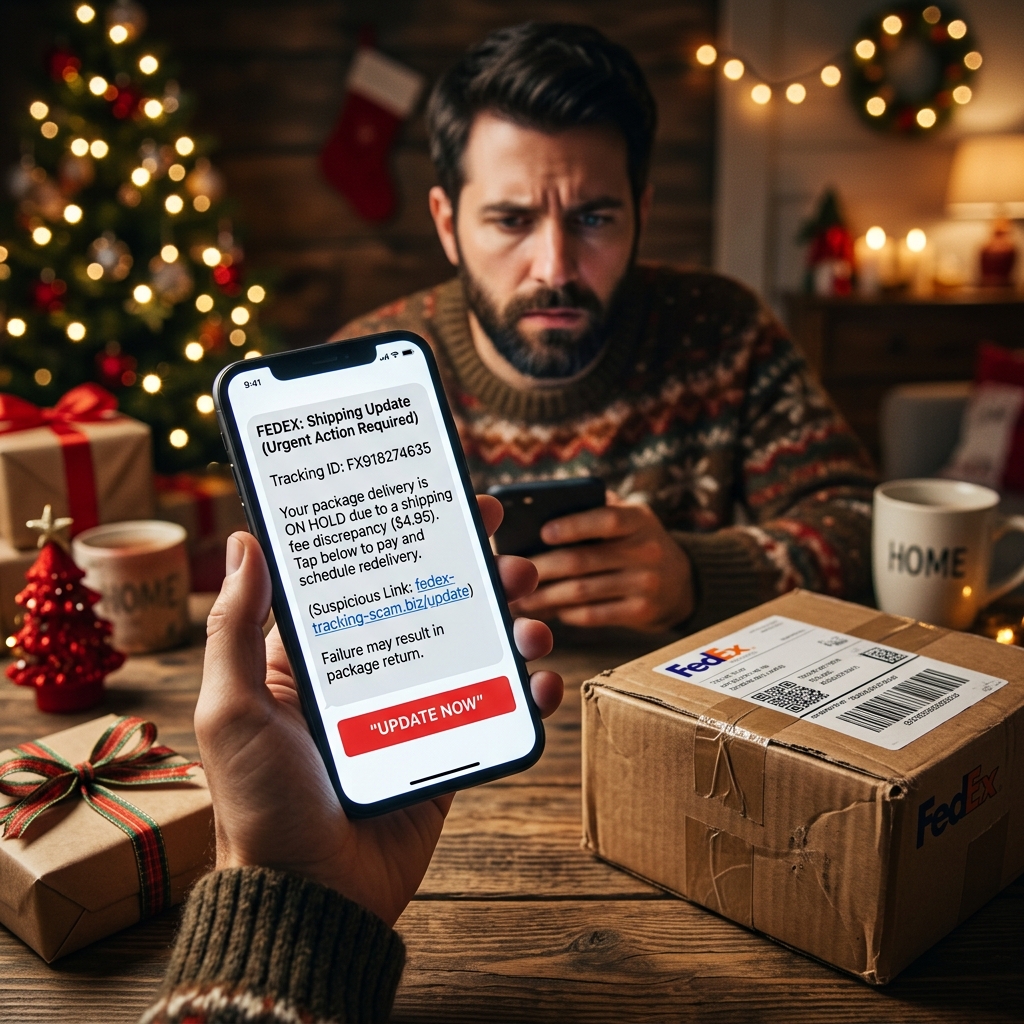
Scammers increasingly use SMS or messaging apps to send fake shipping alerts, because text messages feel more personal and urgent. A typical text might say:
- “FedEx: Your package is being held due to an incorrect address. Update now: [malicious link]”
- “Delivery failed: pay small re‑delivery fee to receive your parcel.”
Consumer protection reports note that these links often lead to fake websites that request credit card details or other personal information.
| Feature | Scam Message | Legitimate Carrier Message |
|---|---|---|
| Sender address | Random or misspelled domain (e.g., fedex‑alerts.com) | Official carrier domain (e.g., fedex.com) |
| Urgency | Threats, penalties, or immediate action demanded | Clear information, but no threats or extreme pressure |
| Attachments | Unsolicited invoices, ZIP files, or documents | Rare; carriers typically avoid unexpected attachments |
| Requests for data | Asks for Social Security number, bank info, or full card details | May ask for tracking or order number; never asks for highly sensitive data |
What FedEx and Other Carriers Say About These Scams
FedEx publicly warns customers about phishing messages that misuse its name, logo, and branding. According to its guidance:
- FedEx does not send unsolicited emails asking for personal or financial information such as account numbers, passwords, credit card numbers, or Social Security numbers.
- Suspicious emails should be forwarded to the company (for example, to designated abuse or fraud reporting addresses) and then deleted.
- Customers should access tracking information by going directly to the official website or app, not by clicking links in unsolicited messages.
In addition, carrier security resources for businesses highlight scams in which criminals attempt to redirect packages, alter labels, or send prohibited goods, and recommend that employees check for unusual requests and verify identities before making changes.
Recognizing the Red Flags: A Practical Checklist
Many phishing messages are designed to be read quickly on a phone, where subtle signs of fraud are easier to miss. Before you click on any shipping alert, run through this checklist:
1. Look Carefully at the Sender
- Check the full email address, not just the display name.
- Be wary of addresses that add extra words, numbers, or unfamiliar domains.
- For texts, be skeptical of random phone numbers or short codes you have never seen associated with the carrier.
2. Examine the Language and Formatting
- Frequent spelling, grammar, or punctuation errors are a common sign of phishing.
- Threatening tone or extreme urgency (“your account will be deactivated today”) is another warning sign.
- Generic greetings like “Dear customer” instead of your actual name may indicate a mass scam.
3. Check the Link Destination Without Clicking
- On a computer, hover your mouse over the link to see the real URL.
- On a phone, you can often press and hold the link (without releasing) to preview the address.
- If the domain name is not the official FedEx or retailer site, do not visit it.
4. Question Any Request for Sensitive Information
- Legitimate carriers will not ask for your Social Security number or full bank account details to deliver a package.
- Be suspicious of any request for a “small fee” via a link, especially if you do not recognize the shipment.
5. Cross‑Check Using Official Channels
- Go directly to the carrier’s website by typing the address into your browser.
- Use the retailer’s app or order history to confirm whether there is a real delivery issue.
- If uncertain, contact customer service using a phone number from a trusted source.
What Happens If You Click or Open the Attachment?
Victims of shipping scams may face different kinds of harm depending on what they clicked or shared. Security experts and consumer reports describe several common outcomes:
- Malware infection: Opening a malicious attachment or visiting a compromised site can install ransomware, spyware, or other malware that may lock your files or monitor your activity.
- Credential theft: Entering login credentials on a fake site can give scammers access to your email, shopping accounts, or cloud storage.
- Financial fraud: Providing credit card details for a fake re‑delivery fee can lead to unauthorized charges or identity theft.
- Identity misuse: If a victim supplies highly sensitive information such as a Social Security number, criminals may attempt to open new accounts or access government benefits in the victim’s name.
Steps to Take If You Suspect You Were Targeted
If you realize you interacted with a suspicious shipping message, acting quickly can significantly reduce the damage. Recommended steps from carriers and consumer protection sources include:
1. Disconnect and Scan Your Device
- Disconnect from the internet if you opened an attachment or installed a file.
- Run a full antivirus or anti‑malware scan using reputable security software.
- Keep your operating system and security software up to date.
2. Change Your Passwords
- Immediately change passwords on any accounts that might have been compromised.
- Enable multi‑factor authentication (MFA) wherever available for added protection.
- Do not reuse passwords across multiple sites.
3. Contact Your Bank or Card Issuer
- If you entered payment details on a suspicious site, contact your bank or card company right away.
- Ask them to monitor for fraudulent activity or issue a new card if necessary.
4. Monitor Your Accounts and Credit
- Watch for unexpected charges, new accounts, or changes to existing accounts.
- Consider credit monitoring or placing a fraud alert if sensitive information was exposed.
5. Report the Scam
- Forward suspicious emails to the carrier’s official abuse or security address so they can investigate and warn other customers.
- Report the scam to national consumer protection agencies or fraud reporting portals where available, which helps authorities track trends and warn the public.
Preventing Future Shipping Scam Victimization
While it is impossible to stop criminals from sending fraudulent messages, you can reduce your risk of falling for them. Consider the following long‑term habits:
- Centralize your tracking: Track packages only through official retailer apps, carrier websites, or confirmed emails.
- Use email filters: Configure spam filters to automatically move suspicious messages to a separate folder.
- Limit where you share your email and phone number: The fewer mailing lists you are on, the fewer opportunities scammers have to target you.
- Educate family members: Talk with relatives—especially children and older adults—about shipping scams so they know not to click unexpected links.
- Stay informed: Periodically review scam alerts from carriers, government agencies, and reputable news outlets.
FAQ: Common Questions About FedEx and Holiday Shipping Scams
1. How can I tell if a FedEx email is real?
A genuine FedEx email will typically come from an official @fedex.com address, reference a shipment you recognize, and avoid asking for sensitive personal information. If in doubt, do not click any links; instead, type the FedEx website address directly into your browser and check your tracking number there.
2. Does FedEx ever ask for my Social Security number or full card details by email or text?
No. According to FedEx and similar carriers, they do not send unsolicited messages asking for financial data, account passwords, or government ID numbers. Any message that requests this kind of information is a strong sign of a scam.
3. I clicked a link in a suspicious shipping text but did not enter any information. Am I safe?
In many cases, the main risk arises when you enter data or download a file, but some malicious websites attempt to install malware automatically. It is safer to run a security scan on your device and monitor your accounts even if you did not fill out any forms.
4. Who should I contact if I get a suspicious FedEx message?
You should report the message to FedEx through its official abuse or fraud reporting channels and then delete it. Additionally, you can report phishing attempts to relevant consumer protection authorities, which helps track and combat ongoing scams.
5. Why do scammers choose shipping companies for their schemes?
Shipping messages are powerful hooks because people often expect them and feel pressure to act quickly to avoid losing a package, especially around holidays. By impersonating a trusted brand and claiming there is a delivery issue, scammers increase the likelihood that recipients will click first and think later.
References
- FedEx holiday email scam: How to spot a fake message, and what to do if you click — Global News. 2017-12-14. https://globalnews.ca/news/3926705/fedex-holiday-email-scam/
- FedEx Holiday Email Scam: How to Protect Yourself — Money. 2014-12-19. https://money.com/fedex-email-holiday-scam/
- Fraud Alert: Don’t fall for this FedEx holiday shipping scam — WJLA / CBS Austin. 2016-12-20. https://cbsaustin.com/news/nation-world/fraud-alert-dont-fall-for-this-fedex-holiday-shipping-scam
- Don’t Waste Your Money | Delivery text scams surge during holiday shipping rush — WDRB News. 2023-12-06. https://www.wdrb.com/news/business/dont-waste-your-money-delivery-text-scams-surge-during-holiday-shipping-rush/article_1c167c58-b412-46e0-8ba6-3096a3f63513.html
- Shipping security tips for FedEx Authorized ShipCenters — FedEx. (Accessed 2026). https://www.fedex.com/en-us/shipping/fedex-authorized-ship-center/shipsource/shipping-security-tips.html
Similar Articles








Read full bio of medha deb