Apple, In‑App Purchases, and the Cost of “Free” Apps
How parents, app stores, and regulators collided over surprise credit card charges in supposedly free games.
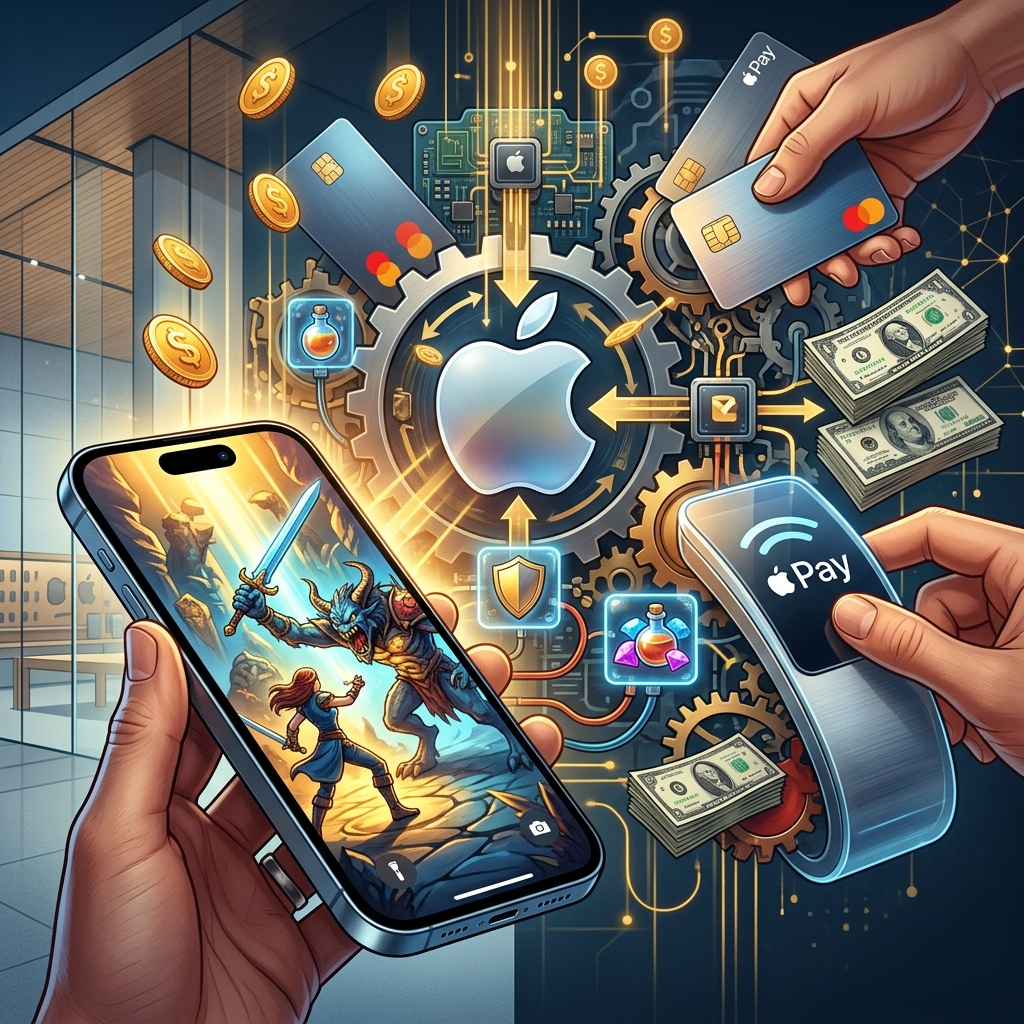
For years, mobile app stores promoted games as free to download while quietly enabling real-money purchases inside those same apps. Parents often discovered this only when their monthly credit card statements showed hundreds of dollars in unexpected charges. That tension between marketing and reality led to high-profile legal actions against Apple and others, challenging how in‑app purchases were designed and disclosed.
This article uses Apple’s litigation over children’s spending in free games as a lens to explain the evolving rules around digital purchases, parental consent, and consumer protection. It focuses on the legal and policy themes rather than any single lawsuit, providing a broader view of what “free” means in the app economy.
The App Economy and the Rise of “Free-to-Play”
As smartphones became ubiquitous, app developers gravitated toward a free-to-play model: users could download games at no cost, then pay for optional extras once they were hooked. This model quickly became dominant in app stores.
- Low barrier to entry: Free downloads dramatically increase the number of installs compared to paid apps.
- Monetization inside the experience: Revenue comes from selling digital goods such as extra lives, in-game currencies, cosmetic upgrades, or premium levels.
- Behavioral design: Many games use reward loops, time limits, and social pressure to encourage frequent small purchases.
In principle, this model can be transparent and fair. In practice, early implementations often blurred the distinction between play and payment, especially for children who might not understand that tapping a button could charge a parent’s credit card.
How In‑App Purchases Work in Practice
On platforms like Apple’s App Store, in‑app purchases are processed through the company’s own payment system. A user typically connects a payment method—such as a credit card or stored balance—to their account. Once authenticated, subsequent purchases can be made with just a tap or password entry.
Typical in‑app purchase flow:
- The app displays an offer (e.g., “Buy 100 gems for $4.99”).
- The user taps the offer, triggering a system dialog managed by the platform (Apple, Google, etc.).
- The user confirms with a password, biometric authentication, or sometimes no further confirmation if a grace window is active.
- The platform bills the stored payment method and delivers the digital goods.
In the early days of mobile platforms, critical safeguards were still developing. Some systems allowed a period after the first purchase during which additional purchases could be made without re-entering credentials, creating an opportunity for rapid, repeated transactions—particularly problematic when children were involved.
Why Parents Were Shocked by “Free” Game Charges
Parents’ complaints often followed the same pattern. A child downloaded a free game, played on a tablet or phone, and made numerous in‑app purchases without a clear understanding that real money was involved. The adult, who might not realize the device was still logged into the app store or that their card was accessible, discovered the charges weeks later.
Common pain points included:
- Misleading labeling: Games were prominently listed as “free,” even though significant spending could occur inside them.
- Insufficient disclosure: Parents argued that information about in‑app purchases and default payment settings was hard to find or unclear.
- Design tuned to children: Colorful graphics, urgent prompts, and rewards encouraged repeated taps, without clear signals that each tap might cost money.
- Lack of separate child accounts: Early systems often made it easy for children using a parent’s device to access the same payment credentials.
These issues triggered regulatory investigations and lawsuits claiming that platforms enabled or failed to prevent unauthorized charges, particularly where minors were involved.
Legal Theories Behind the Lawsuits
When parents and regulators challenged Apple and other platforms over “free” apps and surprise billing, they drew on several branches of law. Although details vary from case to case, common legal theories included:
Unfair and Deceptive Practices
The U.S. Federal Trade Commission (FTC) and state attorneys general frequently rely on statutes prohibiting “unfair or deceptive acts or practices” in commerce. Practices can be deemed deceptive if they mislead a reasonable consumer about costs or terms; they can be unfair if they cause substantial harm that consumers cannot reasonably avoid.
Key arguments in app-related cases often focused on:
- The incongruity between the “free” label and the potential for significant spending.
- The clarity and placement of disclosures about in‑app purchases.
- Whether the platform’s default settings inadvertently enabled unauthorized charges by minors.
Children’s Privacy and Parental Consent
Some actions intersect with laws protecting children online, such as the Children’s Online Privacy Protection Act (COPPA) in the United States. COPPA focuses primarily on data collection from children under 13, but it also reinforces the requirement for meaningful parental consent before certain online activities involving minors.
While COPPA is more about privacy than billing, regulators have evaluated whether mechanisms for parental control and consent in apps aimed at children are robust enough, including in contexts that may lead to purchases.
Contract and Authorization Issues
Another legal dimension concerns contract and authorization:
- Did the parent actually authorize specific in‑app transactions?
- Were the terms of use and purchase policies sufficiently visible and understandable to constitute informed consent?
- Can a child legally bind a parent to a digital contract in these contexts?
Court cases and settlements have pushed app platforms to make the existence and consequences of in‑app purchases more explicit, especially in apps likely to be used by children.
Regulatory and Enforcement Actions Involving Apple
The broader pattern of enforcement shows how regulators view such issues. In separate matters, U.S. agencies have required Apple to change how it handles consumer financial interactions and pay civil penalties when its practices were found to violate law.
For example, in a recent enforcement action, the Consumer Financial Protection Bureau (CFPB) ordered Apple to pay a civil money penalty and change its conduct related to certain financial products. Although that specific case concerned Apple’s role in payments rather than children’s game charges, it illustrates the growing scrutiny of how large tech platforms manage consumer funds, disclosures, and compliance.
Similarly, antitrust and competition cases targeting Apple’s control over app payments have highlighted the company’s ability to set terms and fees for in‑app purchases. These proceedings indirectly affect consumer protection by reshaping the environment in which app developers and platforms design and present purchases.
How Apple and Other Platforms Responded
Legal and regulatory pressure pushed app platforms to revise their systems. Over time, Apple and others introduced more granular controls, clearer labeling, and additional mechanisms intended to reduce unauthorized charges.
Stronger Parental Controls and Authentication
Platforms have expanded settings that let parents limit or block in‑app purchases. Common measures now include:
- Purchase approval: Requiring a password or biometric confirmation for every transaction, or using family approval workflows.
- Disabling in‑app purchases: Allowing users to turn off purchases entirely at the device or account level.
- Child-specific profiles: Creating accounts or profiles that cannot access payment methods without explicit parental configuration.
These changes respond to regulatory expectations that companies must take reasonable steps to prevent unauthorized billing, particularly where minors are likely users.
More Transparent App Store Listings
App stores have also updated how they present information on app detail pages. Typical modern listings:
- Clearly indicate when an app contains in‑app purchases.
- Provide examples of price ranges for common items.
- Offer links to help pages explaining how to manage and disable purchases.
These steps aim to ensure that parents understand that “free” download does not necessarily mean zero spending and can anticipate how costs might arise.
Policy Changes Under Court Orders
Antitrust rulings have required Apple to adjust its App Store policies, including permitting certain alternative payment options or links to external payment pages. While these cases primarily address competition and developer choice, the resulting policy transparency can also benefit consumers by making payment flows more obvious.
| Issue | Past Practice | Typical Modern Approach |
|---|---|---|
| Labeling of apps | Emphasis on “free” downloads with limited detail on in‑app costs. | Explicit notices that apps offer in‑app purchases and may incur charges. |
| Authentication windows | Short grace periods after one purchase where additional purchases needed no new confirmation. | More frequent re-authentication and options to require confirmation for every purchase. |
| Child access to payments | Children often used the same account and card as adults with few restrictions. | Family settings, child accounts, and toggles to limit or disable purchases. |
| Regulatory scrutiny | Early-stage enforcement and guidance still evolving. | Regular enforcement actions and detailed compliance expectations from agencies like CFPB and FTC. |
What This Means for Parents and Consumers
While legal disputes have focused on platforms such as Apple, the practical implications extend to everyday users. Understanding the mechanics and risks of in‑app purchases helps families avoid unpleasant billing surprises.
Practical Steps to Prevent Unwanted Charges
- Review account settings: Check whether in‑app purchases are enabled on each device and account. Consider disabling them on devices primarily used by children.
- Use parental controls: Activate built‑in restrictions for app downloads and purchases, and require approval for transactions.
- Discuss money with children: Explain that virtual items can cost real money and that pressing certain buttons can charge a family credit card.
- Monitor statements: Regularly review credit card and app store transaction histories to spot unusual spending early.
- Contact support promptly: If unexpected charges occur, contact the platform’s customer support as soon as possible; some companies offer refunds in specific circumstances.
Signals to Watch for in “Free” Apps
Consumers can use a simple checklist when evaluating free apps, especially games aimed at children:
- Does the store listing mention in‑app purchases and provide sample price ranges?
- Does the app quickly present purchase offers during onboarding or tutorials?
- Are game progress or rewards tied heavily to buying extra items?
- Is there a clear distinction between play actions and payment actions?
These factors can help predict whether a free app is likely to lead to substantial spending.
Broader Implications for Digital Consumer Protection
The controversies around Apple’s free apps and children’s purchases are part of a larger conversation about consumer rights in digital markets. As payment flows move into apps and platforms, traditional safeguards—such as signed contracts and in‑person disclosures—must be reimagined.
Regulators like the CFPB and FTC increasingly emphasize the need for:
- Clear, plain‑language disclosures before consumers commit to financial arrangements.
- Robust controls that let consumers limit, review, and revoke payment permissions.
- Special protections for children in environments designed for or attractive to minors.
Legal actions involving Apple illustrate how highly integrated tech platforms can face enforcement not only over competition issues but also over how they treat individual users’ finances.
Frequently Asked Questions (FAQs)
Are free apps allowed to charge money through in‑app purchases?
Yes. Free apps can legally offer optional in‑app purchases, provided they comply with consumer protection laws, clearly disclose costs, and obtain valid authorization for each transaction. Regulatory concerns arise when labeling, design, or defaults cause consumers—especially parents and children—to misunderstand or unknowingly consent to those charges.
Why do regulators focus so much on children’s in‑app spending?
Children often lack the experience to distinguish between game actions and financial transactions. Because apps aimed at kids can use persuasive designs and bright rewards, regulators worry that minors may spend without understanding the real-money consequences. Laws and enforcement actions therefore require strong parental controls and clear disclosures in child‑focused digital products.
Has Apple changed its policies because of these issues?
Over time, Apple has updated its payment systems, parental controls, and App Store disclosure practices in response to regulatory expectations, enforcement actions, and broader industry scrutiny. Antitrust cases have also influenced how Apple handles developer payments and external links, indirectly affecting how consumers see and use purchase options.
Can parents get refunds for unauthorized purchases made by children?
Refund policies vary by platform and jurisdiction. Some companies may offer refunds for certain unauthorized charges, especially when minors are involved, but they usually evaluate cases individually. Parents who discover unexpected transactions should contact platform support promptly and may also have rights under consumer protection statutes.
What role do agencies like the CFPB and FTC play in app-related billing disputes?
U.S. agencies such as the CFPB and FTC enforce laws against unfair, deceptive, or abusive practices in financial and commercial activities. They can investigate platforms, issue guidance, negotiate settlements, and impose penalties when digital business models—including in‑app purchases—violate consumer protection rules.
References
- Apple Inc. — Enforcement Action — Consumer Financial Protection Bureau. 2024-11-08. https://www.consumerfinance.gov/enforcement/actions/apple-inc/
- Children’s Online Privacy Protection Rule (COPPA) — Federal Trade Commission. 2013-01-17 (as amended). https://www.ftc.gov/legal-library/browse/rules/childrens-online-privacy-protection-rule-coppa
- Protecting Consumers From Unfair and Deceptive Practices — Federal Trade Commission. 2022-06-10. https://www.ftc.gov/news-events/topics/truth-advertising
- Apple Hit With Class-Action Lawsuit for App Store Injunction Violation — Hagens Berman. 2025-05-02. https://www.hbsslaw.com/press/apple-app-store-injunction-violation/apple-hit-with-class-action-lawsuit-for-app-store-injunction-violation-by-same-law-firm-that-secured-100m-ios-developer-win
- What Apple’s Court Ruling Means for You: The End of 30% Fees — OneSignal Blog. 2025-01-18. https://onesignal.com/blog/what-apples-court-ruling-means-for-you-the-end-of-30-fees-and-whats-next/
Similar Articles








Read full bio of Sneha Tete